Project Planning and Consultation

Project planning assistance and review are free services provided by the U.S. Fish and Wildlife Service. Our biologists can review a project as part of:

  • Technical Assistance: A project that will not involve Federal permitting or funding.
  • Informal Endangered Species Act (ESA) Section 7 Consultation: A project involving a Federal action, permit, fund, or license that is not likely to adversely affect species or critical habitat
  • Formal ESA Section 7 Consultation: A project involving a Federal action, permit, fund, or license that is likely to adversely affect species or critical habitat.
  • Section 10 of the ESA: Non-Federal actions that are likely to take listed species. This process includes development of a Habitat Conservation Plan which will be accompanied by an Incidental Take Permit. The Raleigh Ecological Services Field Office will provide information to help you decide if this is the right choice for you. We recommend you coordinate with our office early if you anticipate this to be the most appropriate path for your project.
  • Emergency Consultation: Assistance with ESA compliance during emergencies (see the Southeastern Emergency Endangered Species Act Section 7 Consultation Resources)

Learn more about ESA Section 7 Consultation and Habitat Conservation Plans.

Before You Begin

First, verify your location to ensure this guide applies to your area.

Ecological Services has two field offices in North Carolina (see map). This guide is only valid for the following North Carolina counties: Alamance, Beaufort, Bertie, Bladen, Brunswick*, Camden, Carteret, Caswell, Chatham, Chowan, Columbus, Craven, Cumberland, Currituck, Dare, Duplin, Durham, Edgecombe, Franklin, Gates, Granville, Greene, Guilford, Halifax, Harnett, Hertford, Hoke, Hyde, Johnston, Jones, Lee, Lenoir, Martin, Montgomery, Moore*, Nash, New Hanover, Northampton, Onslow, Orange, Pamlico, Pasquotank, Pender, Perquimans, Person, Pitt, Randolph, Richmond, Robeson, Rockingham, Sampson, Scotland, Tyrrell, Vance, Wake, Warren, Washington, Wayne, Wilson. For other North Carolina counties, contact the Asheville Field Office

*For projects in Moore County, do not use this process. Please see the Raleigh Field Office’s Moore County web page.

*For projects in the City of Boiling Spring Lakes in Brunswick County, do not use this process. Please see the Raleigh Field Office’s BSL web page.

Process Overview

All reviews begin at the Information, Planning, and Conservation (IPaC) tool, where landowners, consultants, agencies, and anyone that requires U.S. Fish and Wildlife Service review of a project may request an official species list. This web page should be used in conjunction with the Service’s automated IPaC IPaC
Information for Planning and Consultation (IPaC) is a project planning tool that streamlines the USFWS environmental review process

Learn more about IPaC
Tool. It is intended to help you successfully complete IPaC tasks and to create project packages for review by office staff, as appropriate.

Depending on the outcome of this process, you may need to send us your results and request concurrence with your determinations. We recommend that you maintain a complete copy of your correspondence with us. 

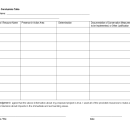
The printable table below provides a convenient place to record information from IPaC, as well as additional information about project activities and potential exposure of species or critical habitat to the activities.

North Carolina Species Conclusions Table

This fillable species conclusions table helps users make quick and accurate determinations to ensure that trust resources are considered and conserved while planning and conducting development activities in eastern and central North Carolina. 

Example of an action area action area
All areas to be affected directly or indirectly by the federal action and not merely the immediate area involved in the action.

Learn more about action area
.

Step 1. Describe the Action Area and Project Activities

Before you begin working in IPaC IPaC
Information for Planning and Consultation (IPaC) is a project planning tool that streamlines the USFWS environmental review process

Learn more about IPaC
, consider how your project may interact with listed or at-risk species and/or their habitats. Under the Endangered Species Act, the Action Area includes “all areas to be affected directly or indirectly by the Federal action and not merely the immediate area involved in the action” (See the Action Area Example, below). A detailed account and analysis of all project activities is necessary to encompass all temporary and permanent changes to “land, water, and air” caused by activities that would not occur but for the proposed action and are reasonably certain to occur. The Action Area also includes areas that are used to help offset project impacts (e.g., areas where species are to be relocated, mitigation areas, etc.).

Document a detailed project description, including: 

  • Project activities
  • Project purpose
  • Project timeline
  • Maps delineating project location and action area
  • Range of impacts, such as ground disturbance, changes in water quality and quantity (surface and groundwater), air quality, artificial lighting, and noise disturbance 
  • Construction and maintenance methods, equipment, and materials being used 
  • Project planning maps and diagrams, including relevant engineering specifications or drawings

The action area you have defined will be drawn in Step 2 using IPaC. Failure to correctly define the action area as instructed will result in incorrect outcomes and may not comply with the ESA.

Step 2. Generate an Official Species List Using IPaC

The Service's online tool, the Information for Planning and Consultation system (IPaC), is intended to help with the consultation process. IPaC provides, among other things, a list of listed and proposed species and critical habitat to be considered for a given action area action area
All areas to be affected directly or indirectly by the federal action and not merely the immediate area involved in the action.

Learn more about action area
. Use IPaC to generate an official species and critical habitat list (OSL) for your action area as follows:

  1. Go to the IPaC website and select GET STARTED (or Log In)NOTE: To test projects or functionality without creating a record in our file system, please use the IPaC Beta site
  2. You will be asked to define your project location (i.e., action area as described above). You can do this a few ways:
    • Method 1: Use the Find Location box by entering an address or latitude and longitude (in decimal degrees). Then use the Define Area box by using the drawing tools to draw the boundary of your project area.
    • Method 2: You may use the Upload Shape File button if you have a GIS shape file of your project area using a .zip folder containing all necessary files
    • Confirm your project location by selecting Continue. You may also select Start Over if you need to redefine your project location.
  3. Once you have defined your project location, you will be taken to a page that provides information regarding the resources in the area. You can use the navigation on the left-hand side of the page to explore the resources present within your defined project area. Click on the species to learn more about it, including project design guidelines (for some species) and a description of suitable habitat. This is an unofficial list of species. If this list is printed, it will include a “not for consultation” watermark.
  4. Request an Official Species List:
    • Click Define Project on the left-hand side of the page.
    • Log-in with your existing IPaC account or create an account in order to proceed.
    • Create a Project Name. A suggested format is: Name of your agency or company, project proponent (if applicable), project name, project code and/or application/permit I.D. number.
    • For Project Description, be sure to include details on the various components of your project, timing, and duration. Please be sure your description addresses the “effects of the action” (i.e., includes any applicable secondary actions). You will see your project name, project description, and project location on the following page. From here, you will be able to complete the initial step of the official ESA review, which is obtaining an official species list.
    • Click Start Review on the right-hand side of the page.
    • Click Continue on the page which describes the steps of the ESA Review process.
    • You will be prompted to request a species list. Click Yes, Request A Species List.
    • Fill in all relevant Contact Information. Verify your project name, description, and location. Provide your lead agency and a project classification.
    • Click Submit Official Species List Request. This request will automatically generate a project tracking number (i.e., consultation code) for your project and will automatically generate an official letter from the USFWS which includes an official species list that is valid for 90 days. This letter will be sent to you at the e-mail address you provided with your IPaC account.
    • If you need to update the species list, select “Need an updated species list?” on the IPaC homepage page. You will need the consultation code and e-mail address used to request the original species list. The consultation code and e-mail address are listed in the official letter. You will get an updated species list under the same consultation code that makes project tracking easier.

If there are listed species or critical habitat on your OSL, add all of them to your species conclusions table and continue to the next step, below. If there are no listed species or critical habitat, your obligations under the ESA are complete. However, until the proposed project is implemented, we recommend checking IPaC every 90 days to ensure that you have current information about listed, proposed or candidate species information for the project.

Video Demos

IPaC Commercial (1:50 min; 11-23-2020)
IPaC 10-minute tour (10:59 min; 06-08-2021)
Requesting an Official Species List on IPaC (11:26 min; 8-25-2022)

Step 3. State Coordination

Contact the North Carolina Natural Heritage Program (NCNHP). The agency maintains a database and has differing expertise and/or regulatory responsibilities. Add any NCNHP documentation to the project review package. Note that NCNHP often does not have data on private lands. A lack of documented species by NCNHP does not provide assurance that the species is absent from the action area action area
All areas to be affected directly or indirectly by the federal action and not merely the immediate area involved in the action.

Learn more about action area
.

(A) If the agency provides documentation that a federally listed, proposed or candidate species is present within the action area, add "species present" under the Conclusions column for the appropriate species on the species conclusions table. If the conclusion for all species on your list is "species present," go to Step 5. Otherwise, continue to Step 4

(B) If there are no documented occurrences of a federally listed, proposed or candidate species within the action area and/or the State agencies do not mention a species on your list, leave the Conclusions column blank in the species conclusions table and continue to Step 4. 

Search or request NCNHP review.

Step 4. Suitable Habitat Assessment and Surveys

Determine whether listed or proposed species may occur based on the habitat present within the action area action area
All areas to be affected directly or indirectly by the federal action and not merely the immediate area involved in the action.

Learn more about action area
for each species on your IPaC IPaC
Information for Planning and Consultation (IPaC) is a project planning tool that streamlines the USFWS environmental review process

Learn more about IPaC
OSL (and on your 
species conclusions table). This information will assist you as you utilize additional IPaC tools in Step 5 and will also provide important information to the Service for our review. Review the species information provided in IPaC, by NCNHP, and on the Service’s webpages for each species. There may also be other sources of information (e.g., habitat assessments, literature, educational webpages) available to determine whether the action area contains suitable habitat for each species. 

Habitat assessments should be conducted by a qualified professional familiar with the species and their habitats. For plants, refer to the Optimal Survey Times for Plants for additional guidance. Species surveys are valid for a certain period of time based on the species' life history. If your existing species survey is no longer valid or the survey does not include the entire action area, obtain a new survey. Handling or researching endangered plants or animals is a regulated activity. If you need a new survey, hire a qualified biologist to conduct the work. State and federal permits may be required for certain species. Federal permit information is available on the Service’s ePermits website. You can learn about the special State license and permits available by visiting the NC Wildlife Resources Commission's (NCWRC) website. If you have questions, contact the NCWRC's Regulated Activities Permit Section at RAPS@ncwildlife.org or call them at 919-707-0061.

(A) If you can confirm suitable habitat is absent within the action area, add "no suitable habitat present" to the Presence in Action Area column in the species conclusions table for the appropriate species, and document what source(s) of information you consulted and why you reached that conclusion in the Documentation column of the species conclusions table. Add this documentation to your project review package.

(B) If there may be suitable habitat for a listed/proposed/candidate species or if you are uncertain about whether the habitat types may support any listed/proposed/candidate species, a detailed habitat assessment is recommended. If the habitat assessment concludes suitable habitat is absent, add "no suitable habitat present" to the Presence in Action Area column in the species conclusions table for the appropriate species, and include why you reached that conclusion in the Documentation column of the species conclusions table. Add the habitat assessment to the project review package. 

(C) If suitable habitat occurs within the action area, species surveys are recommended. Surveys must be conducted by a qualified, permitted biologist familiar with the species, following the survey guidance for each species that may be present. 

If surveys document that a species is present, add "species present" to the Presence in Action Area column in the species conclusions table for the appropriate species. Add the survey report to the project review package.

If surveys fail to detect a species in the action area, add "suitable habitat present, species not detected" to the Presence in Action Area column in the species conclusions table for the appropriate species. Add the survey report to the project review package.

(D) If surveys are not conducted and potential habitat occurs with action area, add "potential habitat present and no current survey conducted" to the Presence in Action Area column in the species conclusions table for the appropriate species. Please note that if suitable habitat is present and no surveys have been conducted, the IPaC Determination Keys (DKeys) will typically provide a determination of “May Affect” for that species. 

Presence of suitable habitat and listed species should be determined by this point.

Step 5. Run IPaC IPaC
Information for Planning and Consultation (IPaC) is a project planning tool that streamlines the USFWS environmental review process

Learn more about IPaC
Determination Keys

IPaC provides “Determination Keys” (DKeys) to help you arrive at a recommended determination for most species in your project area. After completing the questionnaire associated with the OSL, you may proceed to the DKeys, by clicking on “Next Step: Determination Keys.” As many as five separate DKeys are currently available, depending on the location of your project, the species on your OSL, and the answers you provided to the OSL questionnaire. 

The North Carolina Statewide Determination Key should be run for all projects. Other DKeys may be run as applicable. The Statewide Dkey does not include northern long-eared bat or tricolored bat (pictured here). If one or both bats are present on your OSL, please also run the northern long-eared bat and tricolored bat range-wide DKey.

Answer the questions to the best of your ability and upload habitat assessment and survey data when asked. The Dkey will recommend a determination for the species on your OSL.

Once a Dkey is completed, you should be able to print a technical assistance letter (or for federal agencies, a concurrence letter). As with the OSL, you can update the Dkeys in IPaC at any time, by logging into IPaC and returning to “My Projects.” Existing projects should be updated regularly, and creation of duplicate projects should be avoided. If another person needs to work on your project, make them a “member” to your project on the Project Home page by clicking on the member button below the map.

NOTE: If you anticipate that formal ESA consultation will be needed, you may wish to further evaluate the project using IPaC’s Consultation Package Builder (CPB). Use of CPB is not required, and it is not recommended for informal consultation or general project review. 

Save or print all documents provided by IPaC and add them to your project review package. The OSL and applicable DKey Letter(s) should be included in your biological assessment or evaluation. All requests submitted to the Raleigh Ecological Services office must also include the Project Code identified on the IPaC OSL.

Video Demos

North Carolina Statewide DKey - Demonstration for Federal Agencies (05-2026; 39:36 min)
 North Carolina Statewide DKey - Demonstration for Non-Federal Partners (05-2026; 41:13 min)

Step 6. Bald Eagles and Migratory Birds Protection

IPaC IPaC
Information for Planning and Consultation (IPaC) is a project planning tool that streamlines the USFWS environmental review process

Learn more about IPaC
will also indicate the potential presence of migratory birds and other bird species of concern within the vicinity of the action area action area
All areas to be affected directly or indirectly by the federal action and not merely the immediate area involved in the action.

Learn more about action area
. To prevent and minimize potential impacts to migratory birds, please consult the Service’s 
Migratory Bird Program Conservation Measures Library

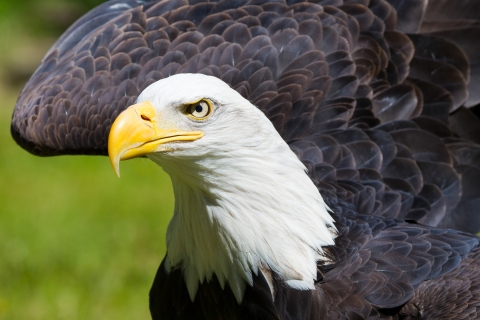
The bald eagle (Haliaeetus leucocephalus) is protected by the Bald and Golden Eagle Protection Act (Eagle Act). Follow the steps below to determine if an Eagle Act permit may be necessary. The Eagle Act protects both bald and golden eagles from take and disturbance. Under some circumstances the Eagle Act may allow take of bald and golden eagles with a permit. The bald eagle nesting (breeding) season in North Carolina is from December 1 through July 15. Determine if the action area intersects within a bald eagle nest buffer using the information gathered from the NC Natural Heritage Program in Step 3. A lack of data from NCNHP is not a guarantee that bald eagle nests are not present. The project proponent should be familiar with the action area and whether potential nesting habitat is present for bald eagles (tall trees near a large waterbody).

To determine if an Eagle Take permit may be necessary, please refer to this link.

Step 7. Determination

Examine the determinations provided by the applicable DKeys for your project and add the DKey determinations to the Determination column in your species conclusions table.

If a "may affect" determination is made for a species/resource, please include all measures proposed to minimize or mitigate for potential impacts in the Documentation of Conservation Measures to be Implemented column. This will help you determine if a may affect determination is "likely to adversely affect" or "not likely to adversely affect" the species/resources” and assist the Service in our review of that determination. 

NOTE:

  • In the North Carolina Statewide Dkey, failure to upload a suitable habitat assessment will result in a “may affect” determination for that species. Consider conducting a suitable habitat assessment and uploading documentation to the DKey.
  • In the North Carolina Statewide Dkey, failure to upload a survey report (if asked) will result in a “may affect” determination. Consider conducting a presence/absence survey for the species and uploading documentation to the DKey. 

Step 8. Project Review Package

Federal agencies 

Federal agencies are not required to contact the Service or provide documentation for "no effect" determinations. For "may affect" or “not likely to adversely affect” determinations, federal agencies should submit the project review package with all requested information as indicated in the checklist below. The Service will make efforts to provide a response to a complete package within 30 days; however, 50 CFR Part 402.13 provides the Service a 60-day review period for informal consultations. 

Non-Federal Applicants/Project Proponents

If requesting a project review, non-federal IPaC IPaC
Information for Planning and Consultation (IPaC) is a project planning tool that streamlines the USFWS environmental review process

Learn more about IPaC
users or project proponents should submit a complete project review package with all requested information as indicated in the checklist, below. The Service will make efforts to provide a response to a complete package within 30 days; however, 50 CFR Part 402.13 provides the Service a 60-day review period for informal consultations.

(A) You may request a review if the ESA section 7 determination for any species or critical habitat is "may affect." Attach the online project review request letter and ensure you provide all requested information as indicated in checklist below. 

(B) You do not need to request a review if the applicable DKey provided the ESA section 7 determination of “no effect” or “not likely to adversely affect” for all species and critical habitat on your OSL. You should save or print the OSL and technical assistance/consistency letters for your files. 

Checklist

Use this list to ensure you have a complete package. Click here for a printable checklist.

Project review package checklist.

Step

Item

Required

Steps 1 and 2Official Species List from IPaC (must include map showing the action area action area
All areas to be affected directly or indirectly by the federal action and not merely the immediate area involved in the action.

Learn more about action area
)
Yes
Step 3NC DNCR-Natural Heritage Program database results or correspondence If applicable 
Step 4Habitat assessments and/or species surveys If applicable 
Step 5IPaC DKey technical assistance letter, consistency letter, or concurrence letterYes
Step 6Bald eagles and migratory birdsIf applicable
Step 7Species conclusions table Yes
Step 8Online project review request letterIf applicable
Other documentation to support your conclusionsHelpful information includes site plans and a description of all planned activities (methods, equipment, materials, time of year, avoidance and minimization measures, etc.)If applicable 

Submit documents electronically to Raleigh@fws.gov.

(A) Format and size: We strongly encourage applicants to consolidate documents into a single PDF, smaller than 25 MB. If a single email would be larger than 25 MB, please consolidate all items into the least number of documents and e-mails as possible.

(B) Subject line: Include the project name and IPaC Code (202X-XXXXXXX) in the Subject Line. Use the same subject line and project reference in all emails related to an individual project. 

(C) Receipt confirmation: All project reviews will receive a return receipt to inform you that your project has been successfully submitted to this office. 

(D) Keep records: Maintain a complete copy of the project review package in your files since it will become an integral part of your official record of compliance. 

(E) Address: Raleigh@fws.gov.

If you have questions or comments concerning this process, please contact our office at (919) 856-4520 or via email at Raleigh@fws.gov