Endangered Species Act Consultation (and Guidance for Other Federal Trust Resources)
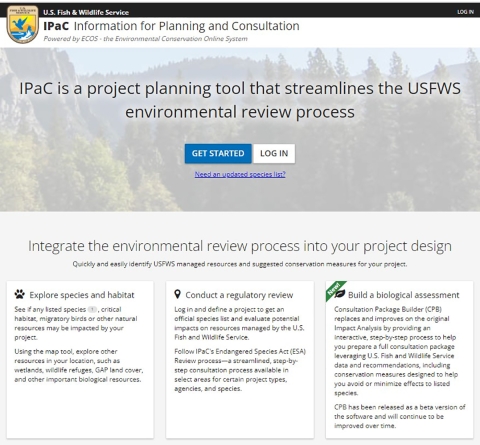
If your proposed project requires review by USFWS under of the Endangered Species Act (ESA), please visit the USFWS Information for Planning and Consultation (IPaC) website. IPaC is a free tool for learning about federally protected species and designated critical habitat that may occur in your or project footprint. There, you can request an Official Species List and use "determination keys" to help you figure out whether your proposed project may impact listed species or designated critical habitat. Determination keys (Dkeys) are logically structured sets of questions designed to assist users in determining if a project falls within the scope of any existing programmatic consultations or within Standard Local Operating Procedures for Endangered Species (SLOPES). Dkeys provide consistent and transparent analyses of the potential effects to listed species and/or designated critical habitat, and significantly reduce the time to complete ESA Section 7 consultation or technical assistance for qualifying proposed projects.
The following Dkeys are available for Louisiana:
- Louisiana Endangered Species Act project review and guidance for other federal trust resources (LA ESA Dkey)*
- Northern Long-eared Bat and Tricolored Bat Range-wide Determination Key
- FWHA, FRA, FTA Programmatic Consultation for Transportation Projects affecting IBAT, NLEB, or TCB
- Department of Defense Determination Key for Indiana Bat, Northern Long-eared Bat and Tricolored Bat
* The LA ESA Dkey covers all federally listed species and designated critical habitat in Louisiana, excluding bats (i.e., northern long-eared bat and tricolored bat). Therefore, both the LA ESA Dkey and the national bat Dkey should be utilized in the analysis of a project’s potential effects to all species and critical habitat that may be in your action area or project footprint.
The LA ESA Dkey also does not cover potential impacts to species or critical habitats proposed for listing under the ESA in Louisiana (e.g., Alligator snapping turtle, Louisiana pigtoe, monarch butterfly, Obivaria cf. unicolor, and tricolored bat). For actions that may affect a proposed species or proposed critical habitat, agencies cannot consult, but they can confer under the authority of section 7(a)(4) of the ESA. Conference is required when the federal action agency determines the agency action is likely to jeopardize the continued existence of any species proposed to be listed under section 4 of the ESA or result in the destruction or adverse modification of critical habitat proposed to be designated for such species. Such conferences can follow the procedures for a consultation (i.e., completing a conference opinion, similar to a biological opinion and issuing an incidental take statement, should take be anticipated) and be adopted as such if and when the proposed species is listed. However, if you conclude that the project will not result in the jeopardy criteria described above, you do not need to provide the Service with documentation. The Service recommends you document your decision for your records if you decide you do not need to confer with the Service. Federal action agencies may voluntarily confer on their actions, but the results of those informal conferences are always non-binding and would have to be adopted as an informal consultation if the action is still ongoing after the species becomes listed under the ESA.
If you’re interested in incorporating voluntary conservation measures into your project to minimize potential effects to listed or proposed species, please visit our library on our website. If you need additional information, please contact our office for assistance.
First Steps: Where can you begin?
All reviews begin at the Information, Planning, and Conservation (IPaC) Tool, where landowners, consultants, agencies, and anyone that requires U.S. Fish and Wildlife Service review of a project may request an official species list.
Video Demos
IPaC Commercial (1:50 min; 11.23.2020)
IPaC 10-minute tour (10:59 min; 06.08.2021)
Requesting an Official Species List on IPaC (11:26 min; 8.25.2022)
How to Use IPaC to request an Official Species List:
- Go to the IPaC website: https://ipac.ecosphere.fws.gov/ and select GET STARTED.
- You will be asked to define your project location. You can do this one of several ways:
- Method 1: Use the Find Location box by entering an address or latitude and longitude (in decimal degrees). Then use the Define Area box by using the drawing tools to draw the boundary of your project area.
- Method 2: You may use the Upload Geometry button if you have a GIS shape file of your project area using a .zip folder containing all necessary files
- Confirm your project location by selecting Continue. You may also select Start Over if you need to redefine your project location.
- Once you have defined your project location, you will be taken to a page which provides information regarding the resources in the area. You can use the navigation on the left-hand side of the page to explore the resources present within your defined project area. Click on the species to learn more about it and a description of suitable habitat.
- Request an Official Species List:
- Click Define Project on the left-hand side of the page.
- Log-in with your existing IPaC account or create an account in order to proceed.
- Create a Project Name. A suggested format is: project name, name of your agency or company, project proponent (if applicable), project code and/or application/permit I.D. number
- For Project Description, be sure to include details on the various components of your project, timing, and duration. You will see your project name, project description, and project location on the following page. From here, you will be able to complete the initial step of the official ESA review, which is obtaining an official species list.
- Click Start Review on the right-hand side of the page.
- Click Continue on the page which describes the steps of the ESA Review process.
- You will be prompted to request a species list. Click Yes, Request A Species List.
- Answer questions regarding the project, your organization, and fill in all relevant Contact Information. Verify your project name, description, and location. Provide your lead agency and a project classification.
- Click Submit Official Species List Request. This request will automatically generate a project tracking number (i.e., consultation code) for your project and will automatically generate an official letter from the USFWS which includes an official species list that is valid for 90 days.
- If you need to update the species list, select “Request Updated Species List?” on the IPaC homepage for your project. You will need the consultation code and e-mail address used to request the original species list. The consultation code and e-mail address are listed in the official letter. You will get an updated species list under the same consultation code that makes project tracking easier.
- If you need to update or adjust your project area, enlarge the map of your project area on the IPaC homepage by selecting the “toggle fullscreen” symbol. Then, select “Edit Location.” You can move the white boxes at each vertices along the polygon. If you need to remove vertices in the polygon, click on the white box and that point will be deleted. You also have the option to “Replace Shape File” with another one.
How to use Determination Keys:
To use a Dkey, follow the instructions below:
- After requesting a species list, you can click Next Step: Determination Keys. Or, from the Project Home, click Start Review.
- Select Evaluate for the appropriate key
- Review the key description and click Check If My Project Qualifies. You will be asked Qualification Interview questions to determine whether the key applies to your project. The Dkey will ask you a series of yes/no questions. Select the appropriate radio button to indicate your response. If you make an incorrect selection, you can click on Change Answer to go back and change your response. If you answer questions that indicate the key does not apply, you will be notified that your project is outside the scope of the key and your project review using IPaC will not be allowed to continue. If you are prompted with this notice, please contact our field office directly to complete your project review.
- If your project qualifies for review using the Dkey, you will also be asked questions to help you reach an effects determination for species and designated critical habitat that are on your species list and covered by the Dkey. You may be offered conservation measures to help avoid adverse effects to listed species. Continue to answer yes/no questions about your project, including whether you are willing to agree to conservation measures. For some questions, you can click on hyperlinks or hover over underlined text to get additional clarification. Some questions, called “semantic questions”, are answered for you automatically based on previous input or spatial data embedded within the Dkey.
- After you finish answering questions about your project, you will be given a preliminary determination for species and designated critical habitat covered by the Dkey. IPaC will generate a letter for your records with the determinations and a copy of all the questions and answers about your project. Click Save and Continue to complete the Dkey.Select Generate Technical Assistance Letter to receive a copy of the letter.
- Read the Technical Assistance Letter carefully to determine if it needs to be sent to our office for review. All information submitted by the Project proponent into IPaC must accurately represent the full scope and details of the Project. Failure to accurately represent or implement the Project as detailed in IPaC or the Dkeys, invalidates the letter. Technical Assistance Letters with “no effect” determinations do not need to be sent in for review unless you feel there could be potential for adverse effects to species that are not accurately accounted for in the IPAC review or letter.
- At any time from your Project Home Page, you can view the species list and letter in Documents.
Video Demo:
Using a DKey -Louisiana Office (11:38 min; 04.20.2020)
Considering Other Federal Trust Resources
IPaC will also indicate the potential presence of migratory birds and other bird species of concern within the vicinity of the action area. To prevent and minimize potential impacts to migratory birds, please consult the Service’s Migratory Bird Program Conservation Measures Library. Finally, IPaC will also indicate if your project is located on a National Wildlife Refuge or within a Coastal Barrier Resource Act zone.
How to Submit a Project Review Package
For projects that received a “May Affect” or a “NLAA” determination after using one or more Dkeys, further coordination is required with the Louisiana Ecological Services Field Office. Please submit the IPaC output letter received from the Dkeys for the project, along with any additional information (i.e. maps, project description, best management practices, lead federal agency for the action if applicable) to our consultation inbox (lafayette@fws.gov).
Submission Guidelines:
Subject line: In your email subject title, indicate your project code (listed on your IPaC report) and project name using the following format as an example: "2023-0049730, Project Name"
Review time: All project review packages submitted to lafayette@fws.gov (except projects involving formal consultation) are typically reviewed by a biologist within 30 days. This timeline is extended if a project review package is incomplete and additional information is required.
Keep records: Maintain a complete copy of the project review package in your files since it will become an integral part of your official record of compliance.
Questions? Please send IPaC related questions to lafayette@fws.gov