Becoming Familiar with the Land Mapper Interface
While the Mapper has been designed to be intuitive enough to jump right in and start using, it is a good idea to spend a bit of time familiarizing yourself with the Mapper's interface. This will show you how to interact with the Mapper's components and introduce the various tools that are available. Refer to the Using the Tools topic for detailed descriptions of each tool.
The Land Mapper Interface
Below is an annotated screenshot of the Mapper's default appearance when you first open it in a web browser. In this example, it is open in Internet Explorer.
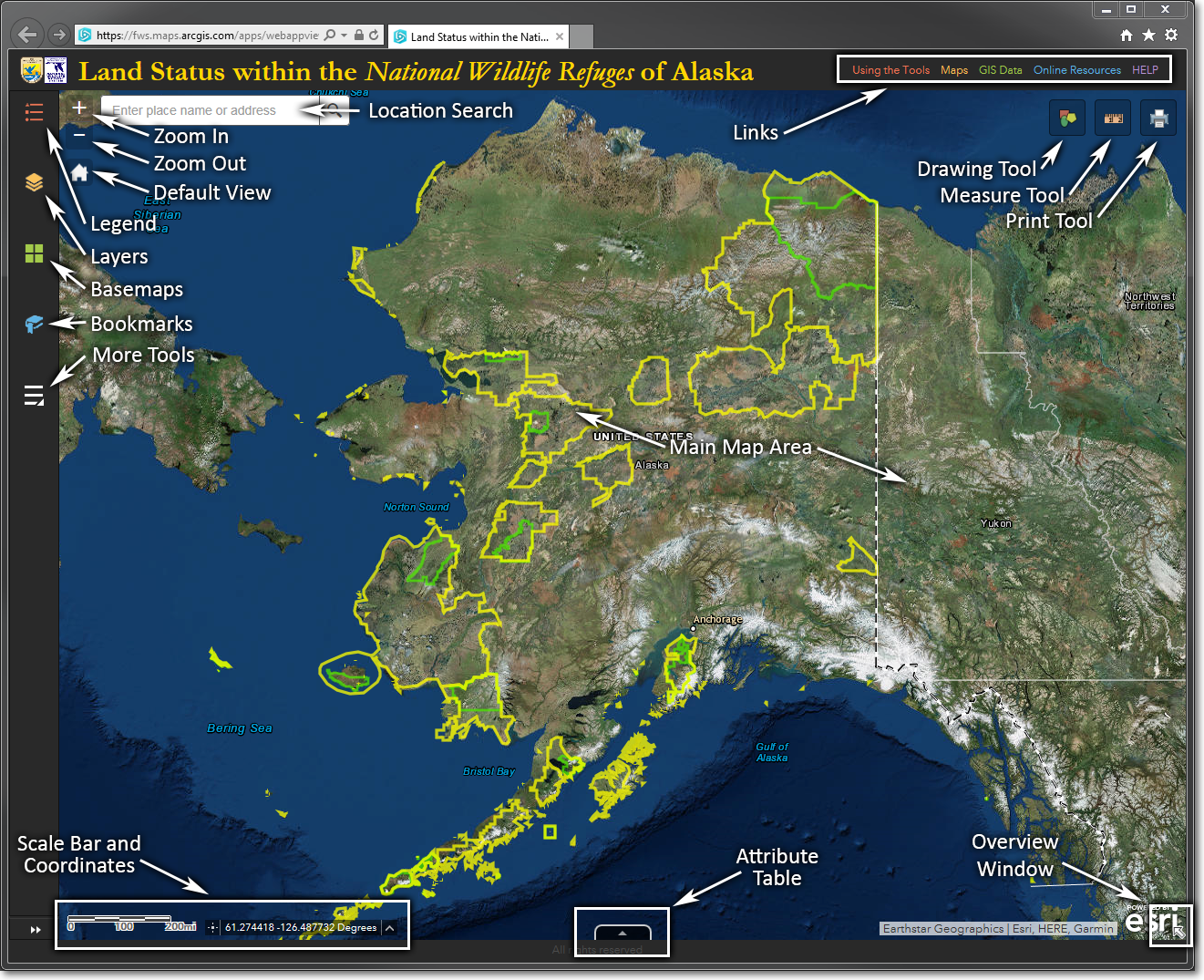
The Land Mapper shown in its default appearance
The primary components of the Land Mapper are:
|
|
Component |
How To Use It |
|
|
Location Search |
Enter a place name or an address and press Enter |
|
|
Zoom In |
Click to zoom in on the map |
|
|
Zoom Out |
Click to zoom out on the map |
|
|
Legend |
Click to display the map legend |
|
|
Layers |
Click to display the list of data layers that you can turn on and off |
|
|
Basemaps |
Click to display a selection of basemaps from which you can choose |
|
|
Bookmarks |
Click to display a selection of bookmarks that zoom in on a particular Refuge |
|
|
More Tools |
Click to display a list of additional tools that you can use |
|
|
Links |
Click the links to view tool information, download maps and GIS data layers, and view the Mapper's Help |
|
|
Drawing Tool |
Click to display pop-up window of drawing tools |
|
|
Measure Tool |
Click to display a pop-up window of measuring tools |
|
|
Print Tool |
Click to display a pop-up window with various options to save and print the map |
|
|
Main Map Area |
This is the main display area of the map |
|
|
Scale bar and Coordinates |
These update dynamically as you pan around, zoom in, and zoom out; also lets you choose a coordinate system |
|
|
Attribute Table |
Click to display the attribute tables of the various data layers |
|
|
Overview Window |
Click to display an overview map window |
The Region 7 Land Mapper was developed, and is maintained by, the U.S. Fish & Wildlife Service, Region 7, Division of Realty. Questions, comments,and suggestions should be directed to ak_realty@fws.gov
This page was last updated: Thursday, March 13, 2025