|
|
Select a Basemap for the Mapper |

By default, topography is shown as the basemap. However, you can choose from several different basemaps to use, depending on what you want to see.
To Change the Basemap
1) Click the Basemaps icon in the upper-left corner of the Mapper. The following menu will pop up:
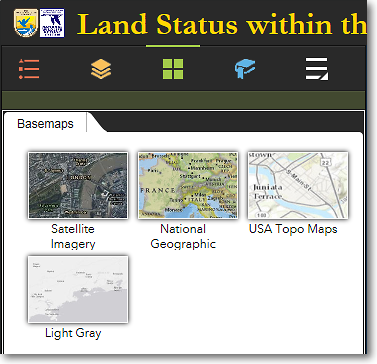
Available basemaps that can be selected
2) To select a basemap, move your cursor over the desired basemap style and click it.
3) The following basemaps are available:
Satellite Imagery
This layer is composed of satellite imagery and aerial photographs. It is currently the best reference layer available for Alaska.
National Geographic
Includes topography and place names. This basemap is best used at statewide or regional scales.
USA Topo Maps
This is a seamless basemap comprised of the standard U.S. Geological Survey topographic maps of Alaska, at both 1:63,360 scale and 1:250,000 scale. The topo maps have been enhanced with hillshading to simulate a three-dimensional effect. One of the greatest benefits of this basemap is the inclusion of all Alaska place names.
Light Gray
This is a simple gray and white basemap. It is useful when you want to identify the various land status colors without the distraction of the colors in the Satellite Imagery or USA Topo Maps basemaps.
|
|
Get just the right colors for your screenshots, prints, and PDFs When saving a screenshot of the Land Mapper or printing the map, it's important that the output focuses the viewer's attention on exactly what you want to convey. You can do this by making sure the basemap colors don't overpower the colors of the layers of interest. Experiment with the available basemaps to get the effect you want for your screenshots, prints, and PDFs. |

The Region 7 Land Mapper was developed, and is maintained by, the U.S. Fish & Wildlife Service, Region 7, Division of Realty. Questions, comments,and suggestions should be directed to [email protected]
This page was last updated: Thursday, March 13, 2025